email alias/forward · C11 · Dhall · cosmocc

Email aliases that
hide your real address.

A compact, self-contained email alias & forwarding server — daemon and DAFSA store in one small binary. Give out disposable alias@domain addresses that forward to your real inbox — and reply through them too. Alias and reply-token routing run on datalog-dafsa's prefix search, so lookups scale with address length, not alias count. Describe every alias in typechecked Dhall; the same C source ships two ways: a single portable APE binary and a WebAssembly build that runs right here in your browser.

One source · two targets

Compiled once for C.
Delivered two ways.

The same lexer, parser, typechecker, and SMTP/address pipeline (src/*.c) build into two artifacts — from your terminal to a browser tab.

Native binary — visage.com

APE · cosmocc

A single self-contained ~2.6 MB polyglot binary — an Actually Portable Executable built with cosmocc (Cosmopolitan libc). The same file runs natively, no VM, no runtime, no recompile:

  • Linux
  • macOS
  • Windows
  • FreeBSD
  • NetBSD
  • OpenBSD

…and any other x86-64 platform cosmocc targets.

An SMTP receiver with a typechecked Dhall config, alias + reverse-alias forwarding, and a durable outbound retry queue. Relay to your mailbox provider over STARTTLS (optionally cert-verified), signing outbound mail with DKIM.

$ ./visage.com daemon -c config.example.dhall
$ make          # builds visage.com
Build & usage

In the browser — visage.wasm

WebAssembly

The real C config + alias pipeline compiled to a small .wasm module (visage.js + visage.wasm). It runs 100% client-side — the actual config_load + address resolution, no server, no build step. Your config and addresses never leave the tab.

The demo below loads the exact config.example.dhall and resolves alias@domain addresses against it — accept/reject, via alias or catch-all, exactly like smtp_in_rcpt_ok() in the daemon.

$ make wasm     # → docs/visage.js + visage.wasm
$ node tests/wasm-smoke.js
Try the live demo ↓

WebAssembly · runs in this tab

Live demo — resolve an alias

Edit the Dhall config (a real CodeMirror editor with Dhall highlighting), then type an alias@domain address. Press Run, Enter, or Ctrl/⌘+Enter. The actual C pipeline (src/config.c + src/mail.c, compiled to wasm) parses the config, typechecks it, and resolves the address — accept/reject, via alias or catch-all.

visage — in your browser wasm
loading wasm…
loading wasm…

What it does

Email aliasing, done in C

Disposable aliases, real forwarding, no lock-in — in a compact single-binary daemon.

Typechecked Dhall config

Aliases, domains, relay, and limits are described in Dhall, typechecked against their schema and evaluated at startup.

SMTP-in-C state machine

A hand-rolled RFC 5321 state machine for the receiver and relay — HELO/EHLO, MAIL, RCPT, DATA, with full bounds-checking on the wire path.

Compact DAFSA store

Aliases live in a datalog-dafsa store: a minimal DAFSA sharing prefixes & suffixes across every key, so it stays tiny. Lookups are byte-prefix walks — WAL/flock durable.

Durable outbound retry queue

Messages spool to disk and are delivered with bounded retries — a relay outage or temporary error never loses mail.

STARTTLS + DKIM

Relay over STARTTLS (optionally starttls-verify against a CA bundle) and sign outbound mail with DKIM, straight from C.

Reverse-alias reply routing

Reply to forwarded mail through a reply+<token>@yourdomain reverse alias, so your real address stays hidden.

Small footprint · prefix-fast lookups

Compact server, compact store

The whole service is one ≈2.6 MB APE binary — and its alias store is a minimal DAFSA that shares prefixes and suffixes across every key, so it stays tiny as aliases grow.

DAFSA prefix search

Every fact is a fixed-width big-endian key, so bind the leading columns and enumerate the rest is a byte-prefix walk. That is exactly the two lookups email routing needs.

O(prefix), not O(aliases)

alias@domain → destinations and reply+<token> → sender are prefix walks over the DAFSA — cost scales with address length, not alias count. No separate index.

mmap + WAL

Relations are served from mmap'd read-only snapshots and durably WAL'd (single-writer, flock) — fast reads, crash-safe writes, no database server.

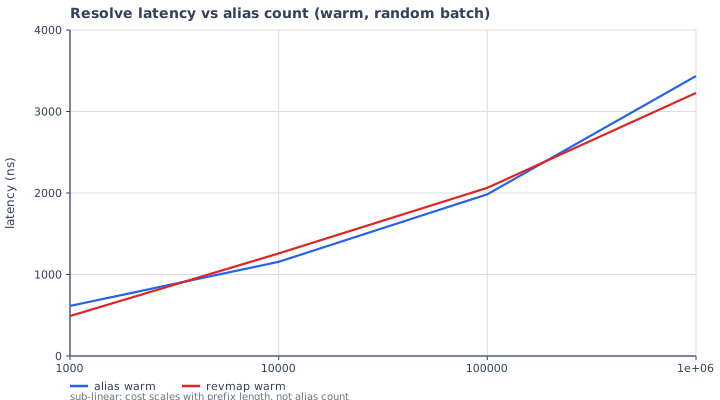
Resolve latency vs alias count: sub-linear, about 0.6 microseconds at 1k aliases to about 3 microseconds at 1M
Warm resolve latency vs alias count — sub-linear: O(prefix), not O(aliases).
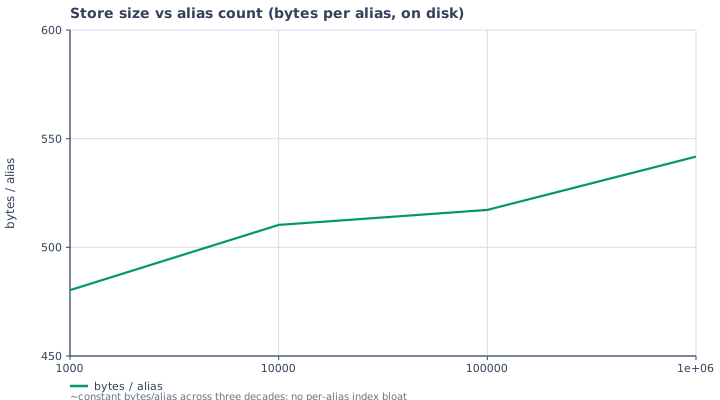
Store size in bytes per alias vs alias count: roughly constant near 500 bytes
On-disk bytes/alias — ~constant across three decades; no per-alias index bloat.

How it works

One daemon, end to end

visage is a single process: it accepts SMTP for the domains it serves, resolves each recipient against the DAFSA store, and forwards accepted mail to your mailbox provider.

1

Accept

The SMTP receiver (src/smtp_in.c) parses the envelope with the real mail_addr_parse(), gates on served domains, and resolves each alias@domain — matching the DAFSA store case-insensitively, then falling back to catch-all.

2

Forward

Accepted mail is spooled to disk and handed to the outbound queue (src/smtp_out.c). Each message is delivered to its destinations with bounded retries, STARTTLS to the relay, and DKIM-signed before it goes out.

3

Reply privately

When you reply, the reply+<token>@yourdomain reverse alias (src/reply.c) is routed back to the original sender — so the sender only ever sees your alias.

The demo above runs step 1 — the actual config-load + recipient-resolution decision — compiled to wasm.

Build & run

Quickstart

Requires cosmocc (Cosmopolitan toolchain). The dhall-c interpreter core and datalog-dafsa store are siblings at ../dhall-c and ../datalog-dafsa; mbedTLS is vendored under vendor/.

Native — make

make            # builds visage.com (APE) + visage.com.dbg (ELF)
./visage.com daemon -c config.example.dhall

Browser — make wasm

make wasm                # → docs/visage.js + visage.wasm
node tests/wasm-smoke.js # headless smoke test

Needs emscripten clang lld llvm nodejs.

Usage

./visage.com <command> [options]

  daemon -c FILE          run the SMTP + admin HTTP daemon
  config-check -c FILE    validate the config file and exit
  add-alias -c FILE --alias A@D --dest X@Y
                          add an alias via the running daemon
  rm-alias  -c FILE --alias A@D --dest X@Y
                          remove an alias via the running daemon
  log -c FILE [-n N]      print recent log entries via the daemon
  --help · --version

Config format

let Auth = { enabled : Bool, username : Text, password : Text }
in  let Config =
      { hostname : Text
      , domains : List Text
      , listen : { address : Text, port : Natural }
      , limits : { message : Natural, line : Natural, rcpts : Natural
                 , cmd_timeout : Natural, data_timeout : Natural }
      , relay : { host : Text, port : Natural, auth : Auth, retries : Natural
                , tls : Text, tls_ca : Text, max_attempts : Natural }
      , storage : { path : Text, spool : Text }
      , reply : { prefix : Text, separator : Text }
      , catch_all : Text
      , aliases : List { alias : Text, destinations : List Text }
      , http : { address : Text, port : Natural }
      , admin : { token : Text }
      , dkim : List { domain : Text, selector : Text, private_key : Text }
      }
in  { hostname = "mx.example.com"
   , domains = [ "example.com" ]
   , listen = { address = "0.0.0.0", port = 2525 }
   , relay = { host = "127.0.0.1", port = 2526, tls = "none", max_attempts = 100, … }
   , catch_all = ""
   , aliases = [ { alias = "jane@example.com", destinations = [ "jane@realmail.example" ] }
               , { alias = "shopping@example.com", destinations = [ "jane@realmail.example", "bob@realmail.example" ] }
               ]
   , …
   } : Config

relay.tls is none, starttls, or starttls-verify (an empty tls_ca uses the embedded Mozilla bundle). See config.example.dhall for the full example.